CDP
The CDP (Customer Data Platform) is your contacts database: every person, business and branch your account has dealt with, with their data, history and segments. Every chat in Smart Chat is a CDP contact; every Outbound campaign goes out to a CDP segment.
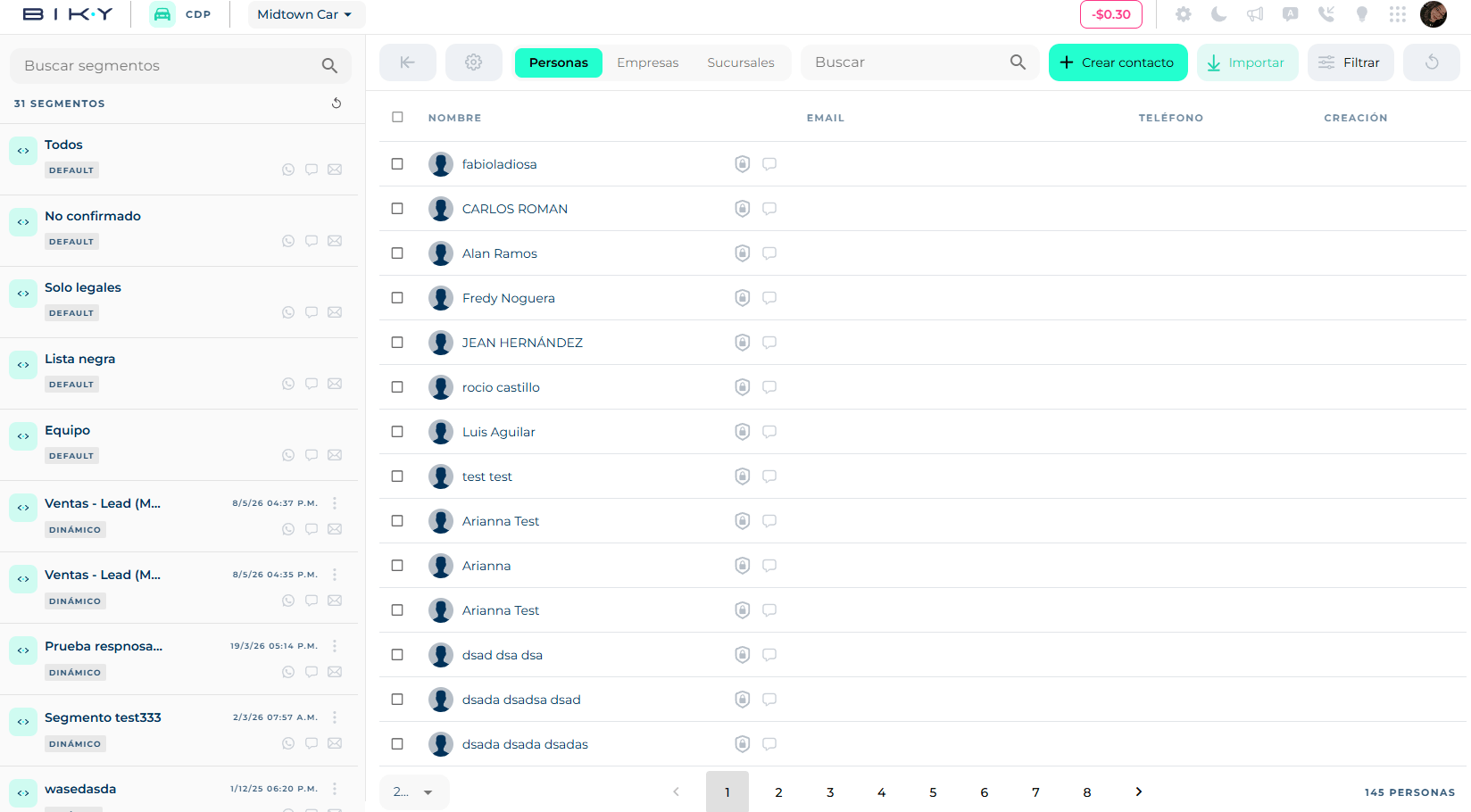
The screen
Segments (left). Search box, counter (31 segments), reload button and the list. Each segment shows its name, type (Default, Dynamic or Static), creation date, number of contacts and three shortcuts to send it an Outbound campaign over WhatsApp, SMS or E‑mail. The ⇤ button in the header hides or shows this panel. See Segments and filters.
Header.
- Adjust table columns (gear): choose which columns to show besides Name: Status, Registration channel, Owner, Business, Alias, Tags, Gender, Language, Country, City, and more.
- The three entity tabs: People, Businesses and Branches. Each has its own segments, filters and table.
- Search by name, email or phone.
- Create contact (on Businesses, Create new… with the Business and Branch options), Import and Filter.
- Reload.
Table. By default it shows Name, Email, Phone and Created; you pick the rest with the gear. Each row has a checkbox to select it, the Verified contact icon when it passed identity verification, and Go to chat to open its conversation in Smart Chat. On Businesses, each row also has + to add a branch and ▾ to expand the ones it has. At the bottom, the page size (20 by default), pagination and the total (145 people).
Contact card. Clicking a row opens it on the right, with the same sections and actions as in Smart Chat. See Contact card.
People, businesses and branches
| Entity | What it is | Example |
|---|---|---|
| Person | An individual customer or prospect. The contact that chats, buys and receives campaigns. | Ana Gómez, +57 300… |
| Business | An organization. Has a tax ID and groups people and branches. | Distribuidora Andina S.A.S. |
| Branch | A physical location of a business. Always belongs to a business. | Distribuidora Andina – North branch |
In this section
- Segments and filters: filter the base and save the filter as a segment; default, dynamic and static segments.
- Create and manage contacts: create people (including the automotive flow), businesses and branches; merge contacts and bulk-edit statuses.
- Import contacts: upload a file, map columns and track the import.