Funnels
Funnels is the sales board: every opportunity is a SalesCard that moves through the steps of a funnel until it is won or lost. Cards are created by your team, by the agent when it detects interest in a chat (Manage Sales cards skill), or from a form or campaign.
Depending on your account's KB System, you probably already have funnels and steps built for your industry, which cannot be modified. See Configure funnels and steps.
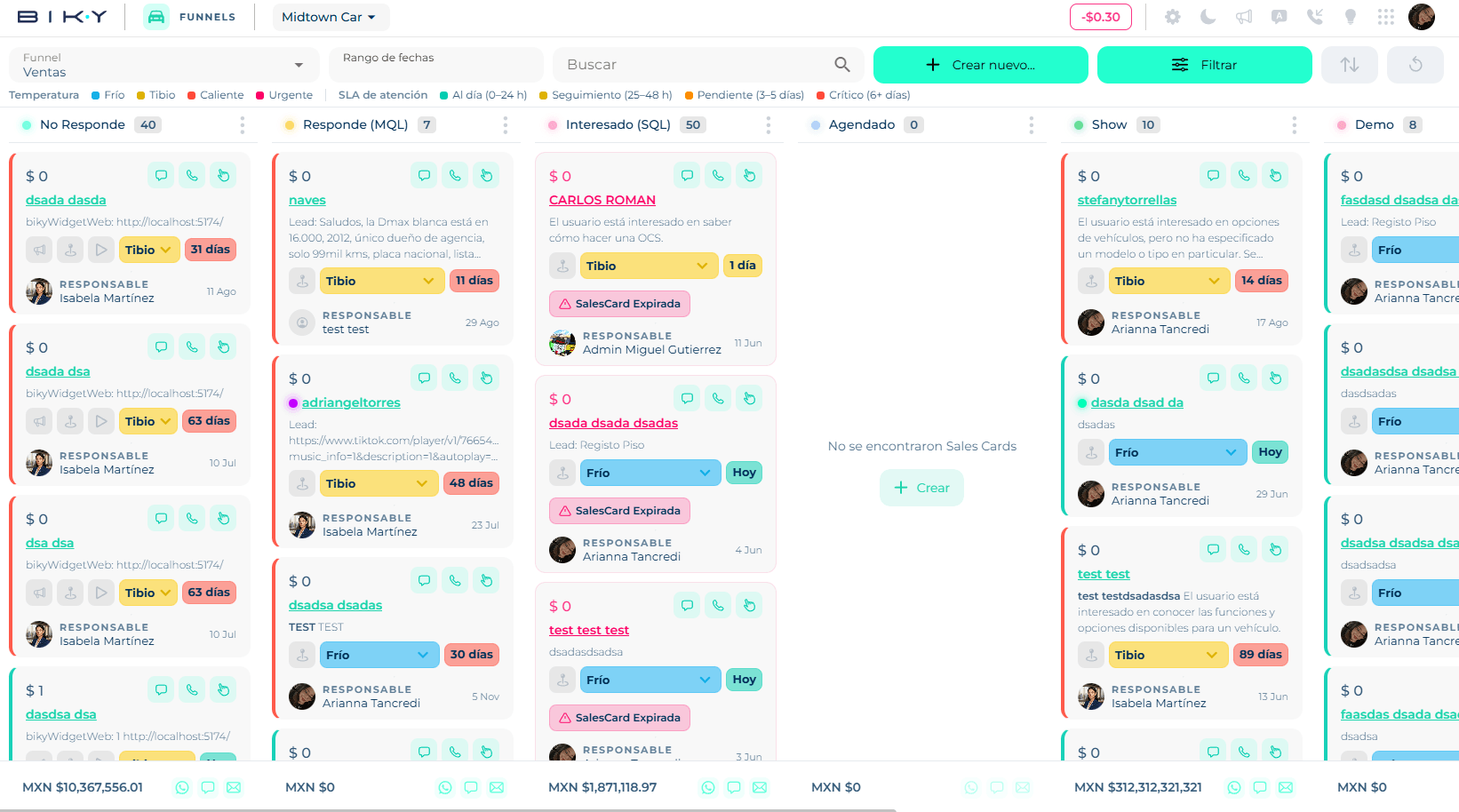
The screen
Header. Funnel selector (with ⋮ to Update or Delete the funnel), Date range (filters cards by creation), Search, Create new… (Funnel, Step, Sales Card), Filter, Sort and Reload funnel.
Legend. Two scales that color the cards:
| Temperature | What it means |
|---|---|
| Cold · Warm · Hot · Urgent | How close it is to closing. Set by the advisor (or the agent) in each card's dropdown. |
| Attention SLA | Time since the last touch on the lead |
|---|---|
| On time | 0–24 h |
| Follow-up | 25–48 h |
| Pending | 3–5 days |
| Critical | 6+ days |
Columns. One per step, with the name, the card count and a ⋮ to Update or Delete the step. At the bottom, the step's accumulated amount and three icons to send an Outbound campaign — WhatsApp, SMS, E‑mail — to every contact in that column (disabled if the active filters do not allow it). If the column is empty, a Create button.
Cards. Each SalesCard shows the amount, the contact (click to open their card), the description, the temperature dropdown, the SLA chip (Today, 3 days…), the owner and the date. Top right, three shortcuts: Go to chat, Call and Touches (log a manual activity). Click the card to open its detail.
Filter and sort
Filter opens a panel with: Owner, Appointment pending, Priority, Creation date, Quote date, End reasons, Space (coordinators only see the spaces assigned to their user), and collapsible groups UTM, Meta Ads, Contacts (status, empty email or phone, habeas data, ID, country, city…) and Products (by name, SKU or brand). On automotive accounts there is also Cars – Sales Card. Clear filters removes them all.
Sort by Creation date, Update date, Step change date or Amount.
In this section
- Configure funnels and steps: create the funnel, define steps, win probability and expiry.
- SalesCards: create, edit, move between steps, win or lose, and what each step asks for.