Segments and filters
A segment is a group of contacts that meet a condition: those who wrote via Instagram this month, those who accepted the data notice but did not buy, those from the León dealership. It lets you look at the base in parts and, above all, choose who receives an Outbound campaign.
Segment types
| Type | How it is created | How it behaves |
|---|---|---|
| Default | Comes with the account. | Fixed: All, Unconfirmed, Legal only, Blacklist and Team. Cannot be edited or deleted. |
| Dynamic | From Filter → Create segment. | Saves the filter, not the list. Every time you open it, it brings the contacts that meet the condition today. A new matching contact joins automatically. |
| Static | From an import. | Saves the exact list of imported contacts. It does not change even if their data changes. |
The difference between dynamic and static
This distinction matters more than it looks, because it decides who your next campaign reaches.
A dynamic segment does not store contacts: it stores a question. For example, "contacts from Bogotá who accepted habeas data". Every time you open it, the CDP asks that question again against the whole database and shows you who meets it at that moment. If ten new contacts from Bogotá come in tomorrow, tomorrow the segment has ten more, with nobody touching it. And if a contact stops meeting it — moved city, revoked consent — they drop out on their own.
A static segment stores a list of names. It is born when you import a file: the contacts in that file are marked as part of the segment and there they stay. Even if their data changes later, and even if new contacts just like them arrive, the list is still the same as the day you uploaded it. It only changes if you import again.
| Dynamic | Static | |
|---|---|---|
| What it stores | The condition (the filter) | The list of contacts |
| How it is created | Filter → Create segment | By importing a file |
| Do new contacts join on their own? | Yes, as soon as they meet the condition | No |
| Do contacts that stop meeting it leave? | Yes | No |
| How many people it has tomorrow | May change | The same, always |
| What it is for | Recurring campaigns and views that stay up to date | A one-off, closed list |
To see it clearly: you create both today with the same 200 contacts. A month later the dynamic one may hold 260 — those who came to meet the condition joined — and the static one still holds exactly those 200.
Which one do I use?
Dynamic for abandoned carts or unanswered leads: you want next month's campaign to reach whoever qualifies then, not whoever qualified today. Static for attendees of the event on the 15th: that list should never grow or shrink.
Segments are per entity: People, Businesses and Branches each have their own list.
Filter the base
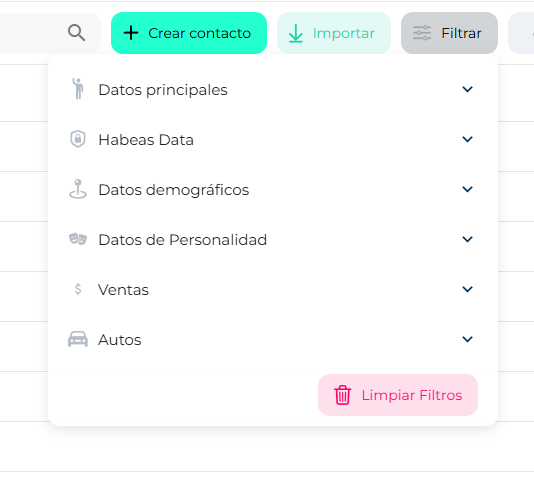
The Filter button opens a panel on the right with the fields grouped. Each group has its own field search:
| Group | What it filters |
|---|---|
| Primary data | Name, email, phone, status, owner, registration channel, tags… |
| Habeas Data | Whether they accepted terms and data processing, and when. |
| Demographic data | Country, city, gender, language, age. |
| Personality data | Traits and interests the agent infers from conversations. |
| Sales | Funnel, step, amount, SalesCard date. |
| [Your category] | The fields specific to your account's sector. On a dealership the group is called Cars; on other accounts, Other. |
Turn on the fields you want; the table filters instantly and the active filters are listed. Clear filters returns to the full base.
Save the filter as a segment
- With the active filters you want, click Create segment at the bottom of the panel.
- Give it a clear name. Below, the active filters it will save are listed for you to confirm.
- Save. The segment appears in the list on the left as Dynamic, with the date and count.
Use a segment
- Click the segment → the table shows only its contacts.
- ⋮ (dynamic and static only) → Rename or Delete (asks for confirmation; deletes the segment, not the contacts).
- The three icons on each segment — Send WhatsApp Outbound, Send SMS Outbound, Send E‑mail Outbound — take you to Outbound with that segment already chosen as the audience.
Automatic sales segments
You will see dynamic segments named like Sales – Proposal sent – 1754917159063. The platform creates them when a campaign is sent from a Funnels step. You can rename or delete them like any other.